



Introduction: Why This Issue Frustrates Users
Few things are more frustrating than unlocking your phone only to see the message “SIM locked” still appear on the screen. Many users assume that once they complete an unlock request, their device should immediately accept any SIM card. Yet in practice, the situation is sometimes more complex.
If your phone shows SIM locked after unlock, it does not always mean the unlock failed. In many cases, the device simply needs additional steps to complete the process, refresh network settings, or synchronize with carrier systems.
Understanding why this happens can save time and prevent unnecessary stress. In this guide, we explain the most common causes of this issue and provide practical troubleshooting steps to resolve it quickly.
Why a Phone May Still Show SIM Locked After Unlock
Several factors can cause a phone to remain locked even after the unlocking process has started. Most of these issues are temporary and can be fixed with a few adjustments.
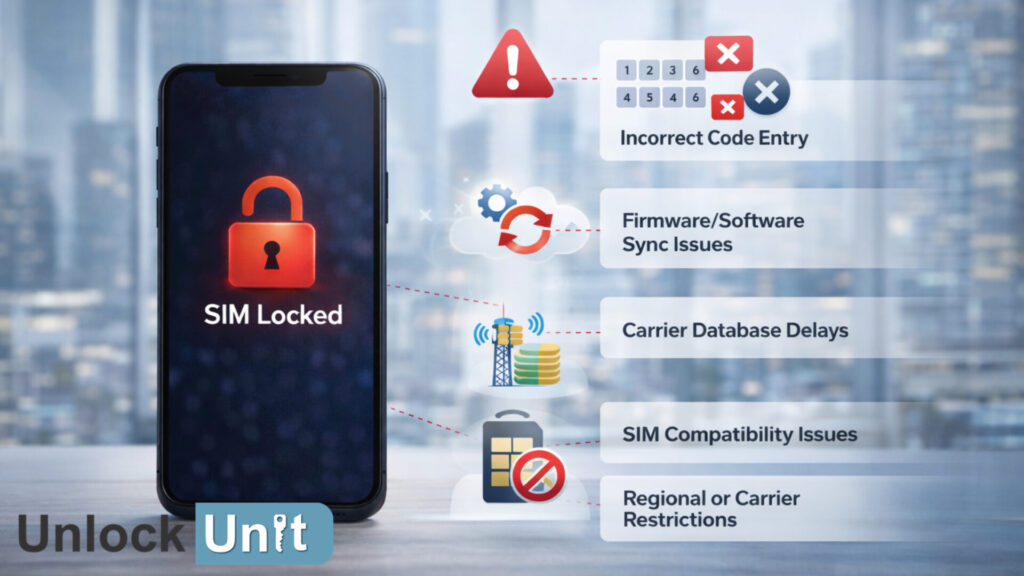
Possible Causes of the SIM Locked Message
Incorrect Unlock Code Entry
Some devices require a manual unlock code. If the wrong code is entered, the phone may continue to show the SIM locked message.
Repeated incorrect attempts can also temporarily block further attempts, which creates the impression that the unlock failed.
Firmware or Software Sync Issues
Even after a successful unlock request, the phone’s software must synchronize with the carrier database. Until that process finishes, the device may still display the lock message.
This delay occurs more often when the phone recently received:
- A software update
- A network configuration update
- A factory reset
Carrier Database Delays
Unlocking typically involves updating the carrier’s IMEI database. If the update takes longer to propagate through the system, the device may temporarily appear locked even though the unlock request has been approved.
Regional or Carrier Restrictions
Some carriers apply additional verification rules. For example, a device purchased in one country may require an extra activation step before working on networks abroad.
In these cases, the unlock process completes successfully but requires a different SIM card or network reset to finalize the update.
SIM Card Compatibility Issues
Sometimes the problem is not the unlock itself but the SIM card used to test it.
Issues may occur if the SIM card is:
- Outdated or inactive
- Not properly inserted
- Unsupported by the device’s network bands
Testing with a different SIM card often resolves the issue quickly.
Step-by-Step Solutions When Your Phone Still Shows SIM Locked
If your phone remains locked after unlocking, follow these steps to resolve the issue.
Step 1: Restart the Device
Restarting the phone forces the operating system to reconnect with the carrier network and reload the unlock status.
Steps:
- Power off the device completely.
- Wait about 30 seconds.
- Turn the phone back on.
In many cases, the unlock status updates automatically after the reboot.
Step 2: Insert a Different Carrier SIM
Testing with another SIM card helps confirm whether the unlock succeeded.
Steps:
- Turn off the device.
- Insert a SIM card from a different carrier.
- Turn the phone back on.
If the phone connects to the new network, the unlock worked successfully.
Step 3: Reset Network Settings
Network configuration errors can prevent the phone from recognizing the unlock. Resetting these settings often fixes the issue.
Typical steps include:
- Open device settings
- Navigate to network or connectivity settings
- Select “Reset network settings”
After resetting, reconnect to the network and test the SIM again.
Step 4: Check Device Unlock Status
Many smartphones display the lock status within their settings menu.
Examples include:
- iPhone: Settings → General → About → Carrier Lock
- Android: Network or SIM status settings
If the phone shows “No SIM restrictions,” the device is already unlocked.
Step 5: Wait for Carrier Processing
If the unlock request was submitted recently, the carrier system may still be processing it.
Some requests take several hours or even days to complete depending on verification requirements.
Waiting a short period before testing again often resolves the issue.
When Professional Help Is Needed
If the phone continues to display SIM locked after unlock despite trying the steps above, professional assistance may be necessary.
You should seek expert help when:
- The unlock request was confirmed but the phone remains locked
- The device rejects multiple SIM cards
- The unlock code fails repeatedly
- The carrier cannot verify the device status
Unlock specialists can verify the IMEI status and determine whether the unlock was applied correctly in the carrier database.
Preventing Unlock Errors in the Future
Although most unlock problems can be resolved quickly, a few precautions can reduce the likelihood of errors.
Verify Device Details
Before unlocking, confirm the correct IMEI number and carrier information. Incorrect details are one of the most common causes of unlock issues.
Avoid Multiple Unlock Attempts
Entering multiple unlock codes or submitting repeated requests can complicate the process. Wait for confirmation before trying additional steps.
Keep the Device Connected to the Network
Ensure the phone remains connected to the carrier network during the unlock process. This allows the device to receive status updates quickly.
Use Trusted Unlocking Services
Reliable unlocking providers ensure that unlock requests are processed correctly and permanently through carrier databases.

Conclusion: Fixing the “SIM Locked After Unlock” Problem
Seeing a SIM locked after unlock message can be confusing, but it rarely means the unlock failed completely. In many cases, the device simply needs a restart, network refresh, or SIM test to recognize the update.
By following the troubleshooting steps above, most users can resolve the issue quickly and restore full carrier flexibility.
Our unlocking service ensures accurate, permanent unlocks processed directly through trusted channels. This approach minimizes errors and prevents the common issues that lead to failed or incomplete unlock attempts.
If your phone still shows SIM locked or you want a guaranteed unlocking solution, contact us today and let our experts complete the process with confidence.